


Ergoniza Intelligent is a digital twin that provides a comprehensive analysis of how different tasks and work activities affect the musculoskeletal system. It combines a three-dimensional biomechanical model, tools for representing activity, and several ergonomic assessment procedures in an interactive web application.
It provides an overall view of exposure by analyzing individual postures, movements that evolve over time, and lifting tasks. Based on the person's characteristics, posture, external forces, supports, and activity duration, it calculates complementary indicators of postural load, effort, stability, and biomechanical demand.
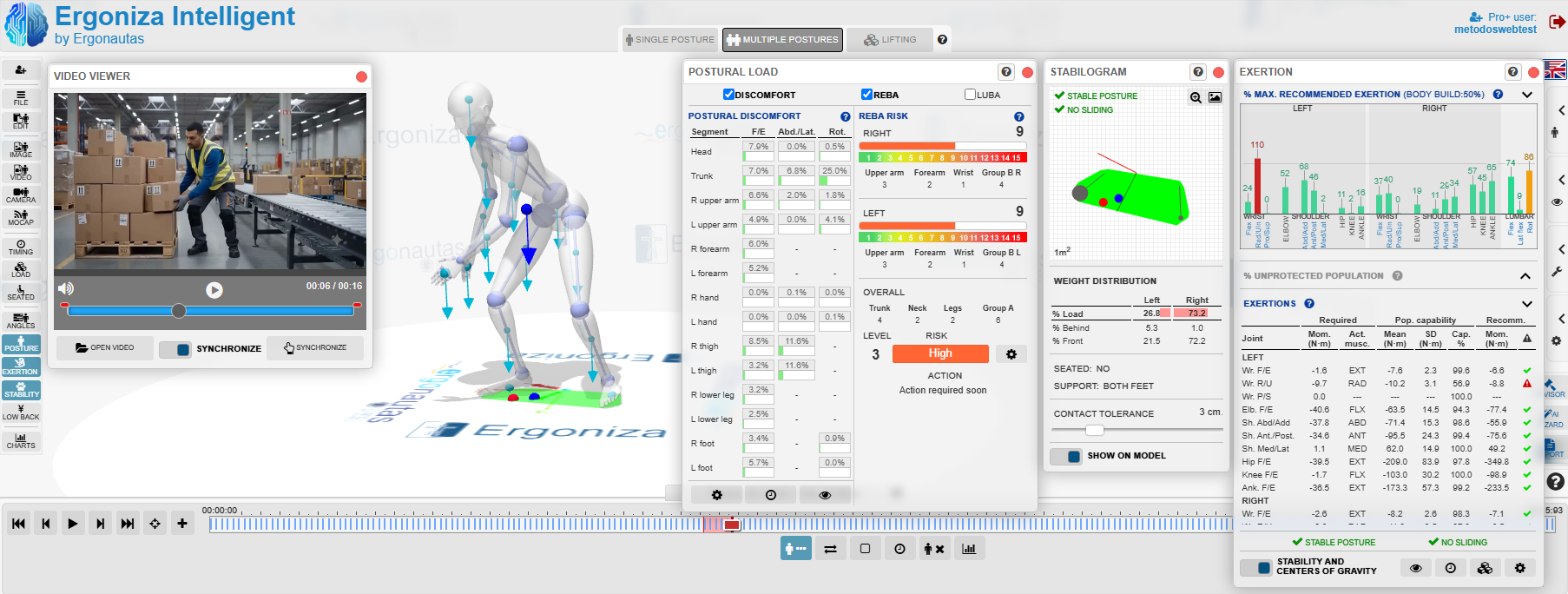
Unlike a tool dedicated to a single method, Ergoniza Intelligent brings together several analytical perspectives on the same representation of an activity. Users can adjust the model's posture, add loads and work conditions, and observe how the results change. This supports both the assessment of an existing situation and the comparison of design alternatives or preventive measures.
The model represents the body through segments and joints and adapts to the anthropometric data of the person being assessed. Users can define loads held in the hands or applied to other parts of the body, external forces and moments, supports, seated posture, exposure times, and activity repetition. The analysis therefore considers not only body position but also the mechanical and temporal conditions under which it is maintained or repeated.
You may be interested in...
See the full documentation for operating procedures and the technical basis of the calculations:
Technical foundations — HTML version
The application provides three main modes. The appropriate choice depends on whether the objective is to study a specific situation, the complete evolution of a task, or a manual load-handling operation. Each mode adapts data entry, available results, and the treatment of time.
| Mode | Main application |
|---|---|
| Single Posture | Analyzes a specific posture together with the loads, forces, supports, and conditions defined for it. |
| Multiple Postures | Represents an activity as a temporal sequence and analyzes its evolution, repetition, and cumulative exposure. |
| Lifting | Assesses lifting or lowering tasks and combines movement representation with specific manual load-handling indicators. |
Postures can be built and corrected manually on the three-dimensional model. They can also be obtained from an image, a video file, or a camera connected to the device. For sequences, video capture records how posture changes throughout the activity and lets the user select an appropriate sampling frequency for the analysis.
Ergoniza Intelligent can also import data captured by external motion-capture systems, including MVNX sequences. Regardless of their source, automatically obtained postures must be reviewed. Users can correct segment orientation, verify supports, and adjust sequence instants before running the calculations.
This combination supports many types of information, from a photograph of a static task to a full recording of an activity or an instrumented capture. Result accuracy always depends on whether the entered posture, conditions, and timing correctly represent the observed work.
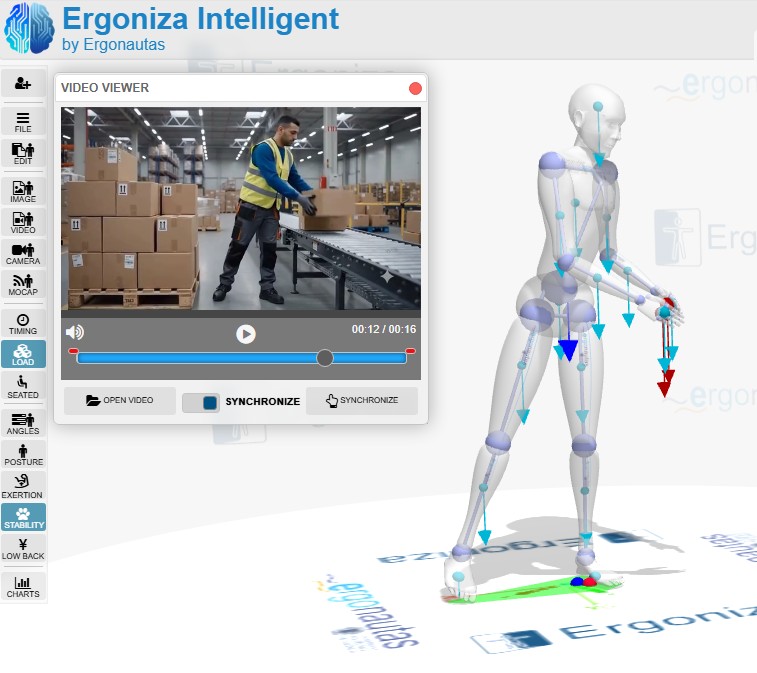 Capturing a posture sequence from video.
Ergoniza Intelligent provides an overall assessment of the activity through complementary results. It identifies the most heavily loaded body regions and helps determine whether a problem arises mainly from posture, applied loads, repetition, duration, or a combination of factors.
Posture can be assessed using postural discomfort and observational methods such as REBA and LUBA. Results are presented by body region to identify deviations, unsuitable or sustained postures, and areas requiring priority review.
The biomechanical model estimates the moments and effort required to maintain the posture and external loads. It can express demand relative to joint capacity and calculate the percentage of maximum recommended effort, the percentage of the potentially unprotected population, and the loads acting on the joints.
For temporal activities, the analysis incorporates duration, repetition, and recovery between efforts to estimate the cumulative effort load. Charts show how indicators evolve and locate the instants at which conditions are most unfavorable.
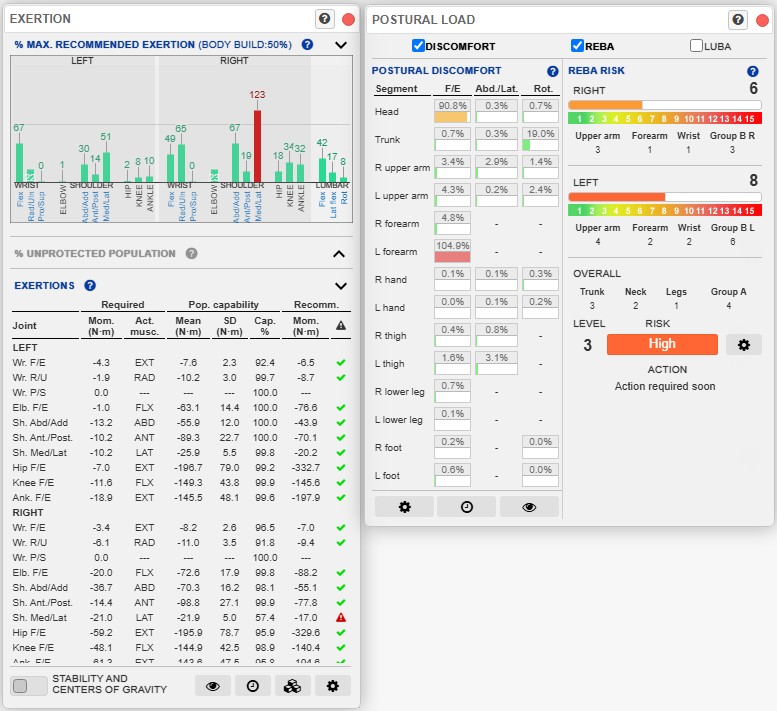 Effort, joint capacity, postural discomfort, and REBA risk indicators.
The stabilogram represents the base of support, the position of the center of pressure, and weight distribution among the supports. This information is used to assess postural stability and slipping. The system also calculates the reaction forces transmitted through the supports and estimates lumbar compression and shear at L4/L5, providing an additional perspective on the mechanical demand placed on the trunk.
In Lifting mode, users can define one or more tasks, their origin and destination positions, weight, frequency, and coupling conditions. The analysis provides the recommended weight limit, the lifting index for each task, and, where applicable, the composite lifting index. These results can be reviewed together with posture and the other available biomechanical data.
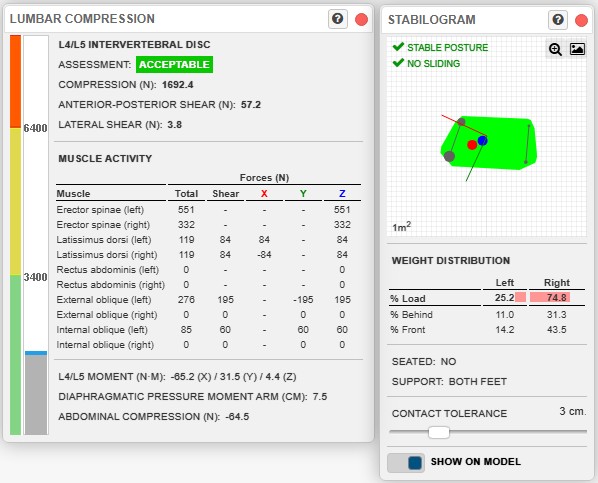 Stability, support, lumbar compression, and lumbar shear indicators.
A large number of results may be available, particularly for activities containing thousands of postures. The Results Advisor brings together the main findings, ranks them by relevance, and helps users locate the aspects that should be reviewed first. Within a sequence, it can select priority instants and provide direct access to the corresponding posture.
The advisor adapts its analysis to the active mode and allows filtering by risk criteria and body part. Its overall assessment does not replace the source results; it organizes them and guides their interpretation. Temporal charts and the display of results on the model complete this review and relate each warning to the posture or condition that caused it.
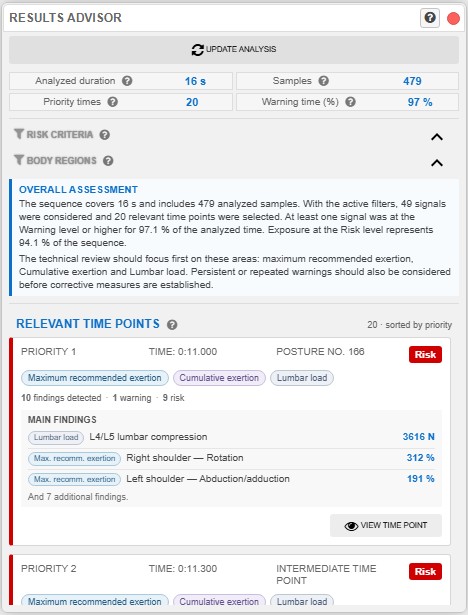 The Results Advisor highlights priority instants and findings.
The application also includes Ergo-Wizard, an AI-based assistant that can summarize results already calculated and provide a general explanation of the findings. This assistant does not recalculate the assessment or replace professional interpretation; it organizes the available information to make it easier to understand and to draft preventive conclusions.
Results can be documented in reports adapted to the type of analysis. For a Single Posture, the report brings together the model configuration, conditions, and selected results. For Multiple Postures, users can generate a report for the current posture or a global sequence report. For Lifting, the document includes the tasks and their specific results.
The report generator lets users select sections, change their order, configure the included results, and review a preview before generating the document. Reports can also include charts, model images, introductory text, and conclusions. Text templates support the reuse of common content while allowing it to be adapted to each assessment.
This flexibility allows the final document to match the purpose of the study: a rapid review of a posture, full documentation of an activity, or a comparison of different intervention alternatives.
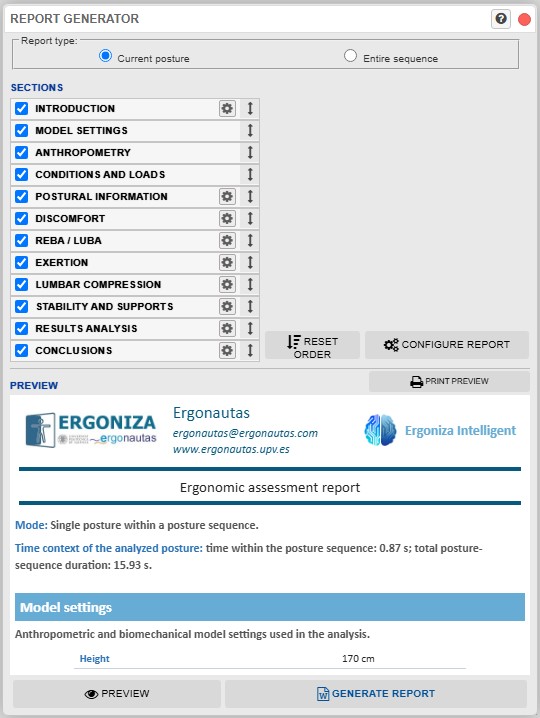 Selecting and configuring report content.
Define the assessment objective. Determine whether a posture, an activity sequence, or a lifting task will be analyzed.
Adjust the model. Enter anthropometric data and select the general conditions representing the person and the task.
Enter the postures. Adjust them manually, capture them from an image, video, or camera, or import an available sequence.
Define activity conditions. Add loads, forces, supports, duration, repetitions, and rest periods when relevant.
Review the information. Verify that captured postures and entered parameters correctly represent the observed situation.
Analyze and interpret. Review postural, biomechanical, temporal, and stability results together and identify priority conditions.
Document and compare. Generate charts and reports and, when useful, modify the task to study the effect of potential preventive measures.
Calculations are based on models and preventive criteria that simplify reality. The results are estimates intended to support ergonomic assessment and must be interpreted by a person with appropriate knowledge of ergonomics, the activity, and the work context. They are not a clinical diagnosis and do not, by themselves, establish the presence or absence of injury.
Before drawing conclusions, users must review posture quality, body orientation relative to gravity, external loads, supports, and temporal parameters. Results should also be compared with direct observation, information from the people performing the task, and other methods or measurements when necessary.
See the full documentation for operating procedures and the technical basis of the calculations:
Technical foundations — HTML version
A cloud based software that integrates more than 21 tools for managing the ergonomics of the workstations in your company.
Evaluate all ergonomic risk factors of the workstations in your company: inadequate postures, repetitive movements, load handling, thermal environment...
Generate fully customizable reports in Microsoft Word or Adobe Pdf format.

Use Artificial Intelligence for automated posture detection from photographs or videos, or to automatically interpret your assessment results and obtain recommendations.
In a multiuser environment so that your company can have access to your data everywhere.
You only need a free account on Ergoniza
ERGONIZA allows you to use Artificial Intelligence for postural load assessment. Automatically capture workers’ postures from a photograph or a video and obtain an automated evaluation of the risk associated with inadequate or forced postures.
The Artificial Intelligence of ERGONIZA interprets the results of your assessments and automatically generates conclusions and recommendations.
AI in actionERGONIZA helps you manage the ergonomics of the workstations of your companies. Evaluate all the risk factors present in the workstations, manage the evaluations, and obtain editable and customizable reports.
You only need to register as a user of ERGONIZA to start testing.
Sign UpErgoniza Intelligent analyzes photographs and videos to identify postures, movements, and working conditions. It provides an integrated assessment of risks related to awkward postures, manual load handling, repetitive movements, exerted forces, overexertion, and stability.
Explore its Technical foundations and User manual to learn about its capabilities, technical basis, and how to use it:
Technical foundations — PDF version
Unlock the full potential of Ergoniza. Pro and Pro+ Registrations provide access to all Pro features in Ergoniza and all Ergonautas content for the duration of the Registration. You may use the results of evaluation methods and tools in your professional work, print reports in PDF or Word, and save your assessments as files to open later.
A Pro Registration lets you use Ergoniza in Pro mode, but does not include access to Ergoniza Intelligent. A Pro+ Registration also includes unrestricted use of Ergoniza Intelligent.
All Ergoniza Pro features, without access to Ergoniza Intelligent.
All Ergoniza Pro features and unrestricted access to Ergoniza Intelligent.
To register as a Pro or Pro+ User, you must first log in to Ergoniza.
(*) In European Union countries, applicable VAT will be added. (**) Prices in U.S. dollars are calculated using the current exchange rate and may vary. Prices shown do not include additional users.
is a web by . Ergonautas is the specialized website in occupational ergonomics and ergonomic assessment of workstations at the . Ergonautas aims to be a useful support tool for the Occupational Risk Prevention and Ergonomics professional and people in training, providing rigorous technical information on occupational ergonomics, online tools for its application, research, training, and participation forums.
Ergonautas is formed by a large human team. In addition to technicians and programmers, the Ergonautas team is made up of researchers and professors from the Polytechnic University of Valencia. The team, led by José Antonio Diego Más, is at the forefront of research and teaching in ergonomics, teaching in official degrees and master's degrees, and developing research projects in the field of ergonomics and new technologies oriented towards humans.
If you need to know more, get in touch with Ergonautas
Or follow us on Linkedin
- - -
© 2006 - Universidad Politécnica de Valencia
 Ergoniza


